React from scratch
Part 1
Although I’m a daily React user, I’ve never done a deep dive into how React works under the hood. I rely on the 20% knowledge I have to leverage 80% of the benefits for building web apps.
After taking Kent C. Dodds’ course on Frontend Masters, I’ve had the urge do a deep dive into the guts of React to really internalize how it works. I’m also a lifelong generalist and have never taken the time to deeply learn a topic just for the sake of learning.
To this end, I’m going to build a simple version of React from scratch. Let’s pretend that Dan did delete the codebase!
I’ll rely on my own shallow understanding of the React API, as well as some API documentation if I get stuck. After each notable feature, I’ll compare and contrast my work with the true React implementation.
Many others have done similar projects, but for learning purposes I’m going to avoid reading their posts and see how far I can get.
By the powers of thesaurus.com, this project will be called recoil.
Goals
The goal for recoil is to support at least:
- Generating HTML from functions (aka Components)
- HTML elements (e.g. div, span, etc)
- Passing props to custom components and HTML elements
- Internal component state w/hooks
- Re-rendering on change state
- One-way data binding
- Reconciliation
- Context API
- JSX through its own webpack plugin
I’ll write about each feature as I build them. That means that I’ll make some decisions early on that I won’t realize are terrible ideas until they later feature from being built.
With that said, let’s get started with the basics.
Rendering components
My understanding of the component rendering process is that React turns functions and objects (aka Components) into HTML elements, and inserts them using the browser’s API.
Let’s start with a function that can create regular html elements (div, span, etc). Our function should be able to take in components and return HTML that looks something like this:
<div>
  <span>
    Hello
  </span>
  <span>
    World
  </span>
</div>
Let’s call that function createElement. It will need an API that looks something like this:
function createElement(elementType, props, render) {
  ...
}
We can start filling in this method. Regardless of the props provided or how render works, we will need to create the opening and closing tags for the element.
function createElement(elementType, props, render) {
  let html = ""

  // Create the opening tag
  html += `<${elementType}>`

  // TODO: Handle rendering by iterating over the results of each child's render call
  html += render()

  // Create the closing tag
  // NOTE: We're assuming all elements have both opening and closing tags.
  // This isn't always the case
  html += `</${elementType}>`
}
Now we just need to figure out how render() will work. I believe that the JSX <div> and <span> tags are just syntactic sugar for calling createElement(). So that means any children of a component would have already called createElement and turned into HTML strings .
function createElement(elementType, props, render) {
  let html = ""

  // Create the opening tag
  html += `<${elementType}>`

  // Call render, which we expect to return an array of 0 or more children.
  // By now, each child is just a string of HTML, since that's what createElement returns.
  // All we need to do is join the resulting strings together to build up the entire app.
  html += render(props).join("")

  // Create the closing tag
  // NOTE: We're assuming all elements have both opening and closing tags.
  // This isn't always the case
  html += `</${elementType}>`

  return html
}
Regular HTML elements have very simple render methods. They just create some opening and closing tags, and render their children between those tags. Since we are already taking care of the tags in createElement, we just need to make sure that render returns an array that we call join() on.
function renderHtmlComponent({ children }) {
  return Array.isArray(children) ? children : [children]
}
Then we can re-create the sample HTML above as a set of createElement calls.
var demoApp = createElement(
  "div",
  {
    children: [
      createElement("span", { children: "Hello" }, renderHtmlComponent),
      createElement("span", { children: "World" }, renderHtmlComponent),
    ],
  },
  renderHtmlComponent
)
Finally, we need to create a <div> in index.html for recoil to insert the result of the rendering.
document.getElementById("recoil-root").innerHTML = demoAppAfter putting it all together, we’ve successfully created these simple elements and put them inside of recoil-root:
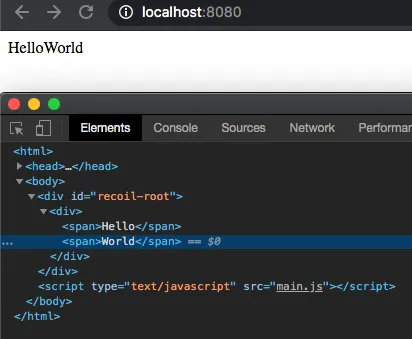
Although we’re still light years away from React, we’ve at least explored the basics of turning functions into DOM elements.
Next up will be adding support for both HTML and non HTML components, as well as adding props.
Part 2
This is my second post in a series where I try to rebuild React from scratch in an effect to improve my understanding about it. As I mentioned before, thesaurus.com has named my library recoil.
In the last post, we ended up with a simple function that could generate a string of HTML text for stock HTML elements like a div.
The next step is to support custom components, one of React’s main features. We need to go beyond the divs, spans, etc.
We last ended off with an API like this:
createElement(
  "div",
  {
    children: [
      createElement("span", { children: "Hello" }, renderHtmlComponent),
      createElement("span", { children: "World" }, renderHtmlComponent),
    ],
  },
  renderHtmlComponent
)
and we defined createElement as:
function createElement(elementType, props, render) {
  let html = ""

  // Create the opening tag
  html += `<${elementType}>`

  // Call render, which we expect to return an array of 0 or more children.
  // By now, each child is just a string of HTML, since that's what createElement returns.
  // All we need to do is join the resulting strings together to build up the entire app.
  html += render(props).join("")

  // Create the closing tag
  // NOTE: We're assuming all elements have both opening and closing tags.
  // This isn't always the case
  html += `</${elementType}>`

  return html
}
To handle both custom components and regular HTML elements, I decided to go with the simple approach of treating regular HTML elements as custom components. In this way I can just create DivComponent, SpanComponent, etc, to handle the common elements. I believe that treating all elements as components will simplify the architecture, but only time will tell.
Let’s start with a component for the <div> element:
function DivComponent({ children, ...otherProps }) {
  // Turn each child into a string of HTML
  let processedChildren = (children || []).map(child =>
    createElement(child, otherProps)
  )

  // Wrap the html string of the children in the div tags
  return `<div>${processedChildren.join("\n")}</div>`
}
Since DivComponent is creating the opening and closing tags, we can simplify our createElement call to just handle the string vs component case, and no longer worry about the elementType. We’ll consider the first argument (component) to be either a function or a string.
function createElement(component, props = {}) {
  // String "component", so just return the string. Like a text node in HTML
  if (typeof component === "string") {
    return component
  }

  // 'render' the component
  return component(props)
}
So now we have a cleaner version of our code from last time, but we still don’t have custom components. Let’s build a custom component that takes a name prop and prints Hello {name}.
const GreetingComponent = ({ name }) =>
  createElement(DivComponent, {
    children: [createElement(`Hello ${name}`)],
  })

// The JSX equivalent would be:
<div>
  hello {name}
</div>
This code produces both the div and our custom component!
<div id="recoil-root">
  <div>Hello Jeff</div>
</div>
And that’s it! Now recoil supports classic elements like <div>, and custom components lke our GreetingComponent.
As cool as that is, at this point we’re still only rendering once. There’s no data binding that causes elements to re-render. There’s also no internal component state.
In the next post, we’ll dive into the useState React hook and how we can implement it in recoil.
Part 3
This is my third post in a series where I document my development of recoil, a React clone built from scratch for learning purposes.
My last post added support for creating stock HTML elements (divs) as well as custom components.
We did this with a simple createElement method that would call a provided render function. The render function returned either a string directly or it called other createElement functions which ultimately returned a string themselves. Then we created a function component called DivComponent to handle <div> creation, and one called GreetingComponent to test custom component creation.
The code looked like:
function createElement(component, props = {}) {
  // String "component", so just return the string. Like a text node in HTML
  if (typeof component === "string") {
    return component
  }

  // 'render' the component
  return component(props)
}

function DivComponent({ children, ...otherProps }) {
  // Turn each child into a string of HTML
  let processedChildren = (children || []).map(child =>
    createElement(child, otherProps)
  )

  // Wrap the html string of the children in the div tags
  return `<div>${processedChildren.join("\n")}</div>`
}

function GreetingComponent({ name }) {
  return createElement(DivComponent, {
    children: [createElement(`Hello ${name}`)],
  })
}
Recoil only supports functional components, so the next step is to give the functional components the ability actually do something by implementing React Hooks. The biggest change here is that somehow state must persist across renders.
Data structure for persisting state
My method for persisting state is to build a Wrapper class around the functional component. This class will store the state as an instance variable, so that subsequent calls to render() can access it.
Then we can build a a tree structure of these Wrapper classes that represent the app and its components. This way we can re-trigger the render() call on the component whenever our hooks are called.
class Wrapper {
  constructor(renderFunc, props) {
    this.renderFunc = renderFunc
    this.props = props
  }

  render() {
    // TODO: Figure out how to create and manage state
    return this.renderFunc(this.props)
  }
}
At this point, we should also split the HTML string generation from the component rendering to keep things simple. We can update createElement to only return Wrappers rather than strings or functions.
function createElement(renderFuncOrString, props) {
  // Only return Wrappers now

  if (typeof renderFuncOrString === "string") {
    return new Wrapper(() => renderFuncOrString, props)
  }

  return new Wrapper(renderFuncOrString, props)
}
Now that we know everything is a Wrapper, we can create another function that converts the Wrapper to HTML. We’ll call this function buildDOM.
Let’s also use the proper browser API to generate HTML elements rather than manually building the opening and closing tags as strings. Eventually we will want to add HTML attribute props like style and onClick, it’s going to be really messy to do the string manipulation ourselves. So we’ll use document.createElement and document.createTextNode instead.
function buildDOM(wrapper) {
  var element = document.createElement(/* TODO: Which HTML tag do we use? */)

  // The result of a render call will either be a string or another wrapper
  var stringOrWrapper = wrapper.render()
  const childrenType = typeof stringOrWrapper

  if (childrenType === "string") {
    element = document.createTextNode(stringOrWrapper)
  } else if (childrenType === "object") {
    // Simplest to always treat the child components in the render() call as an array
    let childWrappers = Array.isArray(stringOrWrapper)
      ? stringOrWrapper
      : [stringOrWrapper]

    childWrappers.map(child => element.appendChild(buildDOM(child)))
  } else {
    throw Error(`Unknown component type: ${typeof stringOrWrapper}`)
  }

  return element
}
The first problem we have is that we haven’t specified what how a Wrapper will be represented in HTML. For example, given this React JSX example:
<MyComponent>Hello</MyComponent>What does <MyComponent> actually become in the DOM? Since you can have onClick handlers on custom components, that means that it must be some element in the DOM. In recoil, I’ll just consider custom components to be <div> elements for now.
Since Wrappers handle both custom components and actual HTML elements, we need to store the HTML tag that each Wrapper corresponds to for the latter case. Let’s update our class definition and include a default tagName of null so that we can tell the difference between a custom component and div. We also need to update our createElement method to take the tag name, as well as plugging in the tag into buildDOM:
class Wrapper {
  constructor(renderFunc, props = { children: [] }, tagName = null) {
    this.renderFunc = renderFunc
    this.props = props
    this.tagName = tagName
  }

  render() {
    // TODO: Figure out how to create and manage state
    return this.renderFunc(this.props)
  }
}

function createElement(renderFuncOrString, props, tagName = null) {
  if (typeof renderFuncOrString === "string") {
    return new Wrapper(() => renderFuncOrString, props, null)
  }

  return new Wrapper(renderFuncOrString, props, tagName)
}

function buildDOM(wrapper) {
  var element = document.createElement(wrapper.tagName || "div")

  var stringOrWrapper = wrapper.render()
  const childrenType = typeof stringOrWrapper

  if (childrenType === "string") {
    element = document.createTextNode(stringOrWrapper)
  } else if (childrenType === "object") {
    let childWrappers = Array.isArray(stringOrWrapper)
      ? stringOrWrapper
      : [stringOrWrapper]

    childWrappers.map(child => element.appendChild(buildDOM(child)))
  } else {
    throw Error(`Unknown component type: ${typeof stringOrWrapper}`)
  }

  return element
}
We still don’t have hooks yet. But we have components that can theoretically persist across renders.
Let’s build a basic, non-functioning counter app to prepare for implementing hooks. First we will create a CounterComponent contains a button and some text:
// The recoil version of a <button> JSX tag
function ButtonComponent({ children = [], ...otherProps }) {
  return createElement(() => children, otherProps, "button")
}

// Simple custom component. Count is hardcoded to 0
function CounterComponent() {
  const count = 0

  return [
    createElement(`Count: ${count}`),
    createElement(ButtonComponent, { children: [createElement("Click me")] }),
  ]
}
Then we generate the HTML and insert it into the DOM so we can actually see it:
const app = createElement(CounterComponent)
const rootElement = document.getElementById("recoil-root")
rootElement.innerHTML = ""
rootElement.appendChild(buildDOM(app))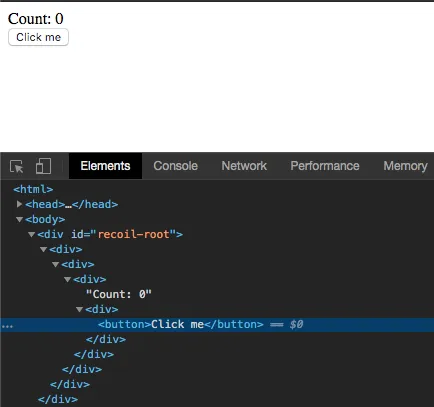
Now we have at least 3 more things to do:
- Come up with our own implementation of React’s useState function.
- Bind the
onClickprop to theonclickattribute of the<button> - Trigger a re-render when the component state changes
For this version, we will re-render the entire app when any component’s state changes.
Implementing useState
useState in React is interesting because it only takes the initial value of the state as an argument. It doesn’t take a this instance, yet it knows how to look up the state for this particular component, and provides a setter function to update this piece of state.
First I tried to explore the ways to detect the caller of a function in Javascript, but this seemed like a huge hack with poor cross-browser support.
Then I realized that since Javascript functions are also objects, I could just use regular object properties to set the relevant state fields on the useState function just before Wrapper.render() calls the components render function. Something like:
For example:
function useState(defaultState) {
  // Need to implement the real logic, but we do have access to state here
  console.log(useState.state)
}

class Wrapper {
  [...]

  render()
    [...]
    // Persist the component's state by putting the last state values into the function object
    useState.state = LAST_STATE
    return this.renderFunc(this.props)
  }
Since useState doesn’t take a variable name as an argument, we must rely on the order of the useState calls to know which piece of state we want to retrieve.
For example, in React components that are built with classes, you can use this.state.count to access the count variable inside of state. With functional components and hooks, the return value of useState includes the value directly, without a name, like:
const [count, setCount] = useState(0)
const [name, setName] = useState(null)
So in this case, our Wrapper must know remember that the first call to useState corresponds to the count variable, and the second call to useState corresponds to name.
With that in mind, let’s build our useState function and update our Wrapper class:
function useState(defaultVal) {
  const { curStateIndex, states } = useState.stateInfo
  useState.stateInfo.curStateIndex += 1

  if (curStateIndex > states.length - 1) {
    useState.stateInfo.states.push(defaultVal)
  }

  // Return the current value for this piece of state,
  // and the setter so that the component can update it
  return [
    states[curStateIndex],
    newVal => {
      states[curStateIndex] = newVal
    },
  ]
}

class Wrapper {
  constructor(renderFunc, props = { children: [] }, tagName = null) {
    this.renderFunc = renderFunc
    this.props = props
    this.tagName = tagName

    // Set the initial state list to be empty
    this.states = []
  }

  render() {
    // Reset the current state index before each render
    useState.stateInfo = {
      curStateIndex: 0,
      states: this.states,
    }

    // Returns wrappers
    return this.renderFunc(this.props)
  }
}
Now we have a simple implementation of the useState hook. But since we don’t have the ability to re-render our components, we can’t actually use it yet.
Component re-rendering
To re-render components, we need a loop that checks if there are any changes that should trigger a re-render. React aims to support rendering of up to 60 FPS. In order to re-render up to 60 times per second, they need to divide that 1 second into 60 frames. 1 sec / 60 frames = 0.0166667 seconds per frame, or 16 about milliseconds. This means that React has a loop that checks for component changes up to once every 16 milliseconds.
Since we’re just getting started, I would prefer to have a slower loop in case I make any mistakes in my re-rendering algorithm. Let’s go with 100 milliseconds per event loop call.
We’ll also create a global variable called NEEDS_TO_RENDER that will be set to true if either useState() or a setter in useState() is called.
function eventLoop() {
  if (NEEDS_TO_RENDER) {
    console.log("RENDERED")

    const rootElement = document.getElementById("recoil-root")
    rootElement.innerHTML = ""
    rootElement.appendChild(buildDOM(app))
    NEEDS_TO_RENDER = false
  }
}

setInterval(eventLoop, 100)
The updated useState():
function useState(defaultVal) {
  NEEDS_TO_RENDER = true

  const { curStateIndex, states } = useState.stateInfo
  useState.stateInfo.curStateIndex += 1

  if (curStateIndex > states.length - 1) {
    useState.stateInfo.states.push(defaultVal)
  }

  return [
    states[curStateIndex],
    newVal => {
      states[curStateIndex] = newVal
      NEEDS_TO_RENDER = true
    },
  ]
}
onClick handler
Now that we have re-rendering built, we can finally hook in the onClick handler to complete our counter app.
First let’s update our CounterComponent to pass an onClick prop and use our new useState method.
function CounterComponent() {
  const [count, setCount] = useState(0)

  return [
    createElement(`Count: ${count}`),
    createElement(ButtonComponent, {
      children: [createElement("Click me")],

      // onClick handler that uses the React hook setter
      onClick: () => {
        setCount(count + 1)
      },
    }),
  ]
}
Then we need to update the function that converts our Wrappers into HTML strings to connect this to the onclick HTML attribute.
function buildDOM(wrapper) {
  var element = document.createElement(wrapper.tagName || "div")

  var stringOrWrapper = wrapper.render()
  const childrenType = typeof stringOrWrapper

  // Added a simple check for the onClick handler.
  // For now only accept onClick handlers of the wrapper is a regular HTML component
  if (wrapper.tagName && wrapper.props.onClick) {
    element.onclick = wrapper.props.onClick
  }

  if (childrenType === "string") {
    element = document.createTextNode(stringOrWrapper)
  } else if (childrenType === "object") {
    let childWrappers = Array.isArray(stringOrWrapper)
      ? stringOrWrapper
      : [stringOrWrapper]

    childWrappers.map(child => element.appendChild(buildDOM(child)))
  } else {
    throw Error(`Unknown component type: ${typeof stringOrWrapper}`)
  }

  return element
}
After connecting everything described above, we have a very simple and functional React hooks implementation in recoil!

The full code for this implementation can be found on github.
Next time we’ll improve recoil so that it only re-renders components that have changed, rather than re-rendering the whole app every time.
Part 4
In the last post I added Hooks and onClick handler support to my React clone called Recoil.
One major remaining limitation in recoil is that it still re-renders the entire app when any component is updated with the setState Hook.
Not only is this inefficient, but it also makes it impossible to rely on the implicit state of HTML elements, like the cursor position and focus state of an <input> tag.
Last time, our event loop ended up like this:
function eventLoop() {
  if (NEEDS_TO_RENDER) {
    console.log("RENDERED")

    //
    // NOTICE: We convert the app into DOM elements on each loop
    //
    const rootElement = document.getElementById("recoil-root")
    rootElement.innerHTML = ""
    rootElement.appendChild(buildDOM(app))
    NEEDS_TO_RENDER = false
  }
}

setInterval(eventLoop, 100)
But we want our event loop to operate like this instead:
// Set the root element contents only once
const rootElement = document.getElementById("recoil-root")
rootElement.innerHTML = ""
rootElement.appendChild(updateOrCreateDOM(app))

function eventLoop() {
  // Re-generate the DOM (if necessary) for any wrappers
  // that have been marked as changed
  while (WRAPPERS_TO_RENDER.length > 0) {
    // updateOrCreateDOM() will traverse the wrappers and
    // update the DOM elements that correspond to wrappers
    // that have changed
    updateOrCreateDOM(WRAPPERS_TO_RENDER[0])
    WRAPPERS_TO_RENDER.shift()
  }
}
To make this happen, we have to do the following things at the lower layers of code:
- Expand our
buildDOM()function from to handle both initial DOM creation for new wrappers and DOM updates on existing wrappers - Update useState to not set the global
NEEDS_TO_RENDER=true, but instead keep track of which particular wrapper needs to be re-rendered
Additionally, I found a few bugs/improvements to make in my implementation from last time:
- Stop generating an extra
<div>around each<div>component - Instead of
DivComponentandButtonComponent, make a more generic function calledcreateHtmlComponentthat takes atagprop - Add support for passing arbitrary attributes to elements
Note that even after this is implemented, we’ll still need to implement the React concepts of mounts/unmounts re-renders. This new planned implementation will still cause any updated components to unmount and re-mount.
Updating buildDOM()
Let’s start with converting buildDOM() to updateOrCreateDOM(), a function that can handle the DOM creation and update cases.
There are two main steps needed to add DOM updating support:
- Each wrapper needs a reference to the DOM element that it represents
- The wrapper element need to replace its inner content with the re-rendered DOM elements if the wrapper state has changed through useState
Converting the original buildDOM() to updateOrCreateDOM() with the relevant cahnges looks like:
function updateOrCreateDOM(wrapper) {
  //
  // CHANGE
  // Check for an existing element for this component wrapper
  //
  var element =
    wrapper.element || document.createElement(wrapper.tagName || "div")

  var stringOrWrapper = wrapper.render()
  const childrenType = typeof stringOrWrapper

  //
  // CHANGE
  // Remove the arbitrary restriction for onclick only being on html components
  //
  if (wrapper.props.onClick) {
    element.onclick = wrapper.props.onClick
  }

  if (childrenType === "string") {
    //
    // CHANGE
    // Always replace the inner content to handle both the create and update cases
    //
    element.innerHTML = ""
    element.appendChild(document.createTextNode(stringOrWrapper))
  } else if (childrenType === "object") {
    let childWrappers = Array.isArray(stringOrWrapper)
      ? stringOrWrapper
      : [stringOrWrapper]

    //
    // CHANGE
    // Always replace the inner content to handle both the create and update cases
    //
    element.innerHTML = ""
    childWrappers.map(child => element.appendChild(updateOrCreateDOM(child)))
  } else {
    throw Error(`Unknown component type: ${typeof stringOrWrapper}`)
  }

  //
  // CHANGE
  // Save a reference to this element on the wrapper, so that when the component updates,
  // we know that this wrapper has an existing HTML element to replace
  //
  wrapper.element = element
  return element
}
Updating useState
To update useState, we just need to remove the code that sets the global NEEDS_TO_RENDER flag, and instead just append the updated wrappers to an array for the event loop to handle.
function useState(defaultVal) {
  const { curStateIndex, states, wrapper } = useState.stateInfo
  useState.stateInfo.curStateIndex += 1

  if (curStateIndex > states.length - 1) {
    useState.stateInfo.states.push(defaultVal)
  }

  return [
    states[curStateIndex],
    newVal => {
      states[curStateIndex] = newVal

      //
      // REMOVED
      // NEEDS_TO_RENDER = true

      //
      // ADDED
      // Append changed component wrappers to list if they don't already exist
      if (!WRAPPERS_TO_RENDER.find(w => w === wrapper)) {
        WRAPPERS_TO_RENDER.push(wrapper)
      }
    },
  ]
}
Improve HTML element creation
My last iteration of recoil had a bug where we kept adding an extra div around every HTML component. Additionally, the API I decided on for creating HTML elements in general wasn’t very good.
Previously, we used to build elements like divs in this way:
function DivComponent({ children = [], ...otherProps }) {
  return createElement(() => children, otherProps, "div")
}

createElement(DivComponent)
Notice how we’re calling createElement with the DivComponent function as an argument, and then within DivComponent we’re calling createElement again. This is the cause of the excess <div> generation.
We can solve both problems by creating a special function for creating elements like so:
function createHtmlComponent({ children = [], tag, ...otherProps }) {
  return createElement(() => children, otherProps, tag)
}

createHtmlComponent({ tag: "div" })
Add attribute support
To make recoil more useful we want to be able to pass arbitrary HTML attributes (e.g. style) to our components. This one is a quick addition in updateOrCreateDOM():
function updateOrCreateDOM(wrapper) {
  [...]

  var element =
    wrapper.element || document.createElement(wrapper.tagName || "div")

  //
  // Extract the onClick attribute, and pass everything else along
  //
  const { onClick, ...attributeProps } = wrapper.props
  if (onClick) {
    element.onclick = onClick
  }

  Object.entries(attributeProps).map(([key, value]) => {
    element.setAttribute(key, value)
  })

  [...]
}
Putting it all together
I’ve prepared a small demo that has a counter component. The component shows a count, and has two buttons for increasing and decreasing the current count. Each counter component uses Hooks to keep track of its own count.
function CounterComponent() {
  const [count, setCount] = useState(0)

  return [
    createHtmlComponent({
      tag: "div",
      style: "border: 1px solid black; padding: 4px; margin: 16px 4px;",
      children: [
        createHtmlComponent({
          tag: "div",
          children: `Count: ${count}`,
        }),
        createHtmlComponent({
          tag: "button",
          onClick: () => setCount(count - 1),
          children: "Subtract",
        }),
        createHtmlComponent({
          tag: "button",
          onClick: () => setCount(count + 1),
          children: "Add",
        }),
      ],
    }),
  ]
}

let app = createHtmlComponent({
  children: [createElement(CounterComponent), createElement(CounterComponent)],
  tag: "div",
})

const rootElement = document.getElementById("recoil-root")
rootElement.innerHTML = ""
rootElement.appendChild(updateOrCreateDOM(app))

function eventLoop() {
  while (WRAPPERS_TO_RENDER.length > 0) {
    updateOrCreateDOM(WRAPPERS_TO_RENDER[0])
    WRAPPERS_TO_RENDER.shift()
  }
}

setInterval(eventLoop, 100)
And here’s how it looks in action:

You can find all of the code for this iteration on Github.
One of the major flaws in this iteration is that recoil still doesn’t support the distinction between rendering and mounting. Every render is a remount/unmount of the underline DOM element, though the Wrapper still remembers the state.
Next time we’ll implement some basic reconciliation, so that we don’t automatically unmount and remount the changed DOM elements on every state change. That will allow us to start supporting things like <input> tags, and forms in general.